
KRR Course Project Assignment#
Knowledge Representation & Symbolic Reasoning
Course Project: RoboCup@Home-inspired Household Tasks
Submission deadline: Friday April 10, 2026 23:59
Submit on Brightspace
Course: RO47014 Knowledge Representation and Symbolic Reasoning, TU Delft, CoR
Contact: Carlos Hernandez Corbato, email: c.h.corbato@tudelft.nl
Introduction#
RoboCup@Home is a robotic competition that explores how robots can assist people in everyday home environments.
In this course project, you will work with a RoboCup@Home-inspired scenario in simulation. Your goal is to build a knowledge-based decision-making system for a mobile robot that must autonomously tidy up an apartment and complete related household tasks.
The project is designed to connect the course topics to a complete robotics application: representing knowledge about the world, reasoning about that knowledge, and using it to drive the robot’s actions in the environment.
Learning Objectives#
By working in groups of three, you will:
Formalize a household robotics task as a knowledge-based decision-making problem.
Model and implement a solution using TypeDB and/or PDDL + PlanSys2 (as covered in the course).
Justify your modeling and engineering choices, including assumptions and limitations.
Communicate your approach and results in a technical report and an oral presentation.
Resources#
This course project builds on the software tools and methods introduced during the course. Only the resources listed below are supported.
1. Simulation Environment#
Mirte Master robot simulation, provided via the course Singularity image
The simulation provides a home-like environment and a set of ROS 2 robot skills for navigation, perception, and manipulation. More information about setting up the environment is found in course setup instruction
2. Symbolic Planning#
PDDL (Planning Domain Definition Language)
PlanSys2, for planning and plan execution in ROS 2
3. Knowledge Graphs and Databases#
TypeDB, including schema definition, data instantiation, querying, and rule-based inference
4. Supported Combinations#
Your project may use:
PDDL + PlanSys2
TypeDB
A combination of both
5. Support#
Instructional support is provided only for the tools and methods covered in the course.
Instructions to complete the project#
Step 1: Register your group#
The course project is compulsory. Students not registered in a group are assumed not to be following the course.
Groups consist of three students and are formed at the start of the course.
Step 2: Complete the course assignments#
During the course, several assignments are given that relate to specific topics, such as symbolic planning and knowledge graph–based reasoning.
These assignments:
Are distributed across the course weeks
Are graded separately from the course project
Provide relevant experience and building blocks for the final project
Step 3: Develop the course project#
Development of the course project should start early and continue throughout the course.
You are expected to integrate the methods and tools introduced during the lectures and practica into a single, coherent system.
Step 4: Write the technical report#
Start writing early to structure and clarify your ideas.
The technical report is a required deliverable and must be submitted by the project deadline.
Step 5: Upload code to GitLab#
GitLab groups are assigned during the course.
All source code developed for the project must be uploaded to your group repository.
Repositories are frozen after the submission deadline.
Important Note
Your repository is frozen after the submission deadline. Late commits will not be considered.
Step 6: Presentation#
Present your project during Week 8 to a committee of experts and peers.
All group members are expected to participate in the presentation.
Robot Task#
The goal of the course project is to design and implement a knowledge-based decision-making system for the Mirte Master robot.
The robot operates in a simulated household environment inspired by RoboCup@Home scenarios and must autonomously perform a set of domestic tasks.
The focus of the project is not on low-level control or perception, but on how symbolic knowledge and reasoning can be used to:
Represent information about the environment and objects
Decide what actions the robot should perform
Coordinate sensing, planning, and execution in a coherent way
Your solution should make explicit use of the knowledge representation and reasoning techniques introduced in the course.
Environment: The apartment#
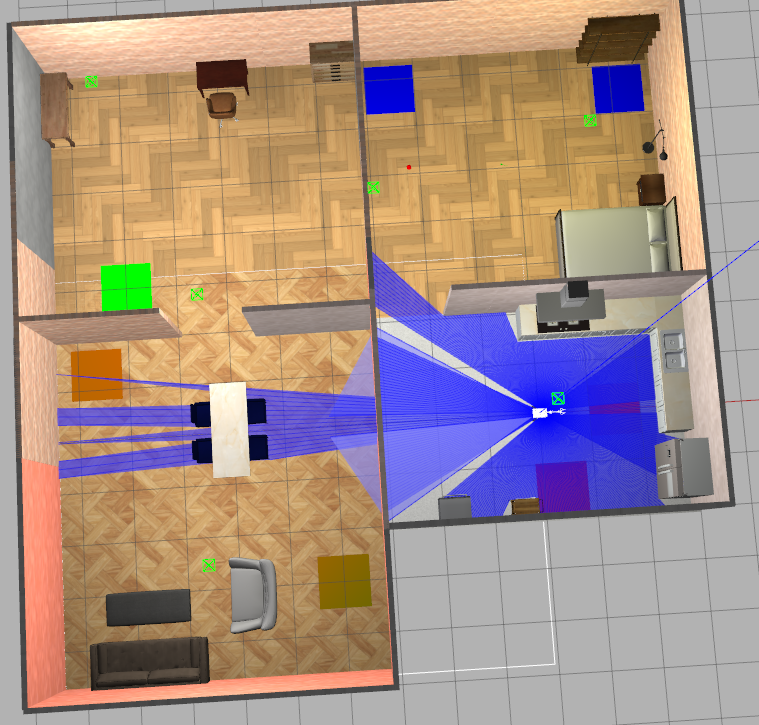
All tasks take place in a simulated apartment environment that resembles a small home.
The apartment consists of the following rooms:
Kitchen
Living room
Bedroom
Guest room
Within this environment, objects are placed on the floor and must be handled by the robot according to the task specification. Each room may contain multiple objects, as well as one or more designated drop locations.
The environment is fixed in layout, but object configurations may change between task runs.
World Assumptions#
To keep the focus on knowledge representation and reasoning, the project operates under the following assumptions:
The robot always starts at a fixed initial location.
The number and positions of drop locations may vary between task runs, but remain fixed during a single execution.
All drop locations have a size of 1 m × 1 m × 0.01 m, and their pose is defined at their geometric center.
Objects present in the environment are known to the system unless stated otherwise.
The robot can safely move over objects lying on the floor without damaging them.
In Task 3 only, objects may be placed in doorways and can block access between rooms. These objects must be handled before the robot can pass through the doorway.
You may rely on these assumptions when designing your system.
Important Objects and Drop Locations#
All objects and drop locations in the environment are identified by a unique entity ID.
Entity IDs starting with
obj_refer to pickable objects.Entity IDs starting with
drop_refer to drop locations.
Each object belongs to a semantic category that determines where it must be placed.
Drop locations Name Format#
The drop locations in the environment are listed in the table below. For each location the intended objects that should be dropped in that location are indicated.
Drop Location ID |
Intended Objects |
|---|---|
|
Dirty tableware (dirty cups, dirty spoons) |
|
Clean tableware and non-empty bottles/cans |
|
Decorative living-room objects (candles, tissue boxes) |
|
Toys (e.g. fidget spinner) |
|
Unknown or uncategorized objects |
|
Bedroom-related items (books, wooden cubes) |
|
Disposable objects (food, paper tissues, empty bottles/cans) |
These semantic rules of intended objects must be respected in Tasks 2 and 3.
Object Name Format#
The environment contains a fixed set of pickable objects that may appear on the floor in different rooms at the start of a task run.
Each object belongs to one of the semantic categories used in the project tasks.
For pickable objects, the entity ID may encode additional properties of the object, such as its type or condition.
For example:
obj_1_cup_dirtyrefers to a cup that is dirtyobj_8_spoon_cleanrefers to a clean spoonobj_4_bookrefers to a book
These identifiers can be used by your system to reason about object categories and task-relevant properties.
The table below lists all object types that can occur in the environment, together with their relevant properties and intended drop location.
Object Type |
Example Entity IDs |
Relevant Properties |
Intended Drop Location |
|---|---|---|---|
Cup |
|
clean / dirty |
dishwasher or tableware |
Spoon |
|
clean / dirty |
dishwasher or tableware |
Plate |
|
clean / dirty |
dishwasher or tableware |
Bottle / Can |
|
empty / not empty |
trash or tableware |
Food item |
|
disposable |
trash |
Paper tissue |
|
disposable |
trash |
Candle |
|
decorative |
living room |
Tissue box |
|
decorative |
living room |
Toy |
|
toy |
toys |
Book |
|
bedroom-related |
bedroom |
Wooden cube |
|
bedroom-related |
bedroom |
Unknown object |
|
uncategorized |
general |
Notes:
*in an entity ID denotes a numeric identifier that is unique per object.Clean and dirty tableware must be handled according to the semantic rules of the task.
Empty bottles and cans are considered trash; non-empty bottles and cans are considered tableware.
Unknown object types must be placed at
drop_5_general.
The exact number of objects and their initial placement may vary between task runs, but all objects belong to one of the categories listed above.
Tasks#
The course project consists of three tasks that build on the same environment and robot skills.
You will implement a single system that can be launched for each task.
Task 1: Simple Tidy Up#
The robot shall tidy up the apartment by picking up all objects lying on the floor.
Each object must be placed in the closest drop location within the same room. The robot must tidy up all rooms.
Task 2: Tidy Up Following House Rules#
The robot shall tidy up the apartment by moving each object to the drop location that matches the semantic rules of the environment (e.g., tableware, toys, trash).
The mapping between object categories and drop locations is specified in this document.
Task 3: Find and Bring an Object#
The robot is requested to find and deliver obj_4_book.
The book may be located in any room.
Contextual clues indicate where the book is likely to be:
Clue Observed in Environment |
Likely Location |
|---|---|
No clues |
Office |
Dirty tableware present |
Bedroom |
Clean tableware present |
Living room |
Clean and dirty present |
Bedroom or living room |
Doorways may be blocked by objects and must be cleared before passage.
Software Setup for KRR#
To develop and test your course project, you will use a ROS2 simulation environment provided via a Singularity container. This ensures that all students work with the same software versions and dependencies.
The Singularity image contains:
The Mirte Master robot simulation
All required ROS 2 packages
Planning and knowledge-related software used in the course
Please go to the KRR setup instructions to get an understanding on how to setup the simulation and software environment on your local computer.
Robot Skills (ROS 2 Services)#
To perform its tasks, the Mirte Master robot exposes a set of robot skills via ROS 2 actions and services. These skills allow your system to interact with the environment at a symbolic level.
\item[pick:] This service requests a pick action, and results in the object whose id is given as an argument in the request to be attached to Mirte’s gripper if
the gripper is empty and the object is located in a radius of 0.5 of the mirte’s coordinate frame and less than 0.1m behind it in mirte’s x coordinate. This service can also be called without passing an object_id, in this case, Mirte tries to pick the closest object. (Note that the pick action is not physically realistic. Mirte can “pick” an object right under it, but not if it is slightly behind its center.)\
The following skills are available:
NavigateToPose
ROS 2 action provided by Nav2 to navigate the robot to a target pose. More details about the action are found in the documentation of the Nav2 stack.pick
Requests the robot to attach a nearby object to its gripper. Before calling the action the gripper is empty and the object is located in a radius of 0.5 of the mirte’s coordinate frame and less than 0.1m behind it in mirte’s x coordinate. Also note that this service can be called without passing an object_id, in this case, Mirte tries to pick the closest object. (The pick action is not physically realistic. Mirte can “pick” an object right under it, but not if it is slightly behind its center).An example to request the robot to pick up a specific object using the ROS 2 service call is:
ros2 service call /pick_object krr_mirte_skills_msgs/srv/PickObject "{object_id: obj_1_spoon_clean}"This command requests the robot to pick up the object with the specified entity ID, provided it is reachable and the gripper is free.
place
Requests the robot to place the currently held object at a nearby drop location. If there was no object attached to the gripper, or there was no storage object located less than \reach, the action does not change the state of the system and the service returns false and an error string.An example to request the robot to place any held object using the ROS 2 service call is:
ros2 service call /place_object krr_mirte_skills_msgs/srv/PlaceObject
get_objects_in_room
Returns information about objects and drop locations present in the room where the robot is located (including dooray areas).An example to request the information of objects and drop off points in the room where the robot is currently located is:
ros2 service call /get_objects_in_room krr_mirte_skills_msgs/srv/GetObjectsInRoom
get_object_info
Returns information about the object currently held by the robot, including its type and properties, such as clean, dirty, emtpy, etc.An example to request the properties of the currently held object using the ROS2 service call is:
ros2 service call /get_object_info krr_mirte_skills_msgs/srv/GetObjectInfo
get_drop_locations
Returns the poses and identifiers of the drop locations in the current room.An example to request the drop off locations in the room where the robot is currently located using the ROS2 service call is:
ros2 service call /get_drop_locations krr_mirte_skills_msgs/srv/GetDropLocations
These skills form the interface between your knowledge-based decision-making system and the simulated robot.
Assessment#
Assessment rubric available on Brightspace.
Deliverables#
You will be graded on the following deliverables for your course project:
Presentation
Technical report (max 5 pages, IEEE format)
Source code on GitLab
Technical Report Sections#
The report shall have a maximum of five pages in \href{https://www.ieee.org/conferences/publishing/templates.html}{IEEE conference format} (A4, 11pt), including figures. References do not count towards the page limit. The first page must include the title of the project, your group number and the student names and student numbers.
The technical report shall have a maximum of five pages and must follow IEEE conference format (A4). The first page must include the title of the project, your group number and the student names and student numbers, while further the report should contain at least the following sections:
Abstract: a summary of the report in no more than 100 words.
Introduction: present your formal formulation of the KRR problem in the course project, and briefly introduce and motivate your approach to solve it. Include the references used. You can use a figure to provide an overview of your solution. Tip: you can use this figure in your presentation. Recommended length: 0.5 pages.
Methodology: describe and motivate how you address the tasks as one or multiple reasoning problems, detailing and justifying the types of representations and reasoners that you have chosen. Tip: you can use a couple of snippets of your representations also for your presentation. Recommended length: 1-1.5 pages.
Implementation: explain the software implementation of your solution, indicating and justifying your choices of reasoning libraries and of any reasoning that you may have decided to implement yourself. Include clear naming references and links to your code, and add relevant code snippets. Recommended length: 1 page.
Results: describe the results using figures and tables as appropriate and explaining the metrics used. Results are expected both for symbolic reasoning and planning, and final robot simulation performance. You can include a video link showing the system’s performance. Recommended length: 1 page.
Discussion: discuss the results obtained with your solution, both from a theoretical perspective (e.g. limitations of the representations or method used) and an implementation perspective (e.g. limitations of the software libraries used). Include recommendations on how the solution could be improved. Recommended length: 0.5 pages.
Bibliography: References used in the project and that support the content of your report.
Software source files#
You must upload the source code developed for your project to the GitLab group provided to you so that we can execute it if needed. The main repository for your project should contain a README file with clear instructions on how to install and execute your code.
Presentation#
The presentations will take place in the last week of the course (week 8) during the course hours, following an order that will be announced some days in advance. All students are required to attend all the groups’ presentations.
Your presentation must be in English, of 14min (8min presentation, 5min questions and feedback, 1min handover to the next group) duration per group and all group members shall equally share the stage and also answer the questions from the audience.
The presentation should contain at least the following sections:
Task formalization and methodology.
Design of your solution, explaining the choices you made.
Optional Current results: discussion of your current results and, if available, a video showing your results in the simulation.
Participation will be assessed, all students are required to ask at least one question or give one point of feedback during the two days of presentations.
Additionally, you should bring your slides in a USB and copy them to the class computer before the class starts.
Appendices#
Drop Locations#
All drop locations have the same fixed size:
(1, 1, 0.01)
The pose of a drop location is defined at the geometric center of the square.
Default drop location poses:
drop_1_dishwasher = ( 1.5,     0.0,     0, 0, 0, 0 )
drop_2_tableware  = ( 0.3569, -1.4761, 0, 0, 0, 0 )
drop_3_livingroom = ( -4.0,   -3.0,    0, 0, 0, 0 )
drop_4_toys       = ( -8.0,    3.0,    0, 0, 0, 0 )
drop_5_general    = ( -2.5096, 6.7897, 0, 0, 0, 0 )
drop_6_bedroom    = ( 2.1527,  6.5192, 0, 0, 0, 0 )
drop_7_trash      = ( -8.6458, 1.3064, 0, 0, 0, 0 )
From the pose, each square extends:
±0.5 m in X
±0.5 m in Y
±0.005 m in Z
Room Coordinates#
Rooms in the apartment are defined as polygonal areas in the global map frame.
Each room is specified by a list of corner coordinates in counterclockwise order.
For example, the kitchen is defined as:
"kitchen": [(-3.06, 2.04), (2.71, 1.95), (2.77, -1.94), (-3.07, -1.92)]
These coordinates can be used to:
Determine in which room the robot is located
Associate objects with rooms
Reason about room-level task constraints
Room coordinates:
kitchen:      [(-3.06, 2.04), ( 2.71, 1.95), ( 2.77,-1.94), (-3.07,-1.92)]
living_room:  [(-3.15,-4.84), (-9.56,-4.79), (-9.36, 1.88), (-3.25, 1.81)]
office:       [(-3.25, 2.04), (-9.36, 2.11), (-9.35, 7.37), (-3.24, 7.37)]
bedroom:      [( 2.76, 2.18), (-3.02, 2.05), (-2.99, 7.35), ( 2.76, 7.38)]
Doorway coordinates:
kitchen_to_bedroom: [(-3.01,1.84), (-3.01,2.36), (-1.58,2.36), (-1.58,1.84)]
kitchen_to_living:  [(-3.46,0.63), (-2.70,0.63), (-2.70,-0.74),(-3.46,-0.72)]
bedroom_to_office:  [(-2.73,3.47), (-3.42,3.52), (-3.42,4.86),(-2.73,4.86)]
office_to_living:   [(-5.06,2.61), (-5.06,1.53), (-7.24,1.53),(-7.24,2.61)]
Behavior Trees#
Behavior Trees (BTs) are a formalism for structuring and controlling action execution in robotic systems.
They represent behavior as a tree composed of nodes such as sequences, selectors, conditions, and actions.
In this course setup, Behavior Trees are primarily used internally by the navigation stack (Nav2) to manage:
Goal execution
Recovery behaviors
Navigation-related decision flow
PlanSys2 also relies on Behavior Trees to execute symbolic plans by mapping high-level actions to concrete robot skills.
You are not required to design or modify Behavior Trees for this project.
However, understanding their role may help you interpret how navigation and action execution are handled at runtime.
Behavior Trees used by Nav2 and PlanSys2 are defined using XML files and executed automatically by the system.
ROS with TypeDB#
To use ROS with TypeDB, you can use the ros_typedb package. You can find instructions on how to use it in the repo README.
ros_typedb is included in the course software setup. However, to
access the examples created by Joris Sijs, you need to checkout the
course_krr branch:
cd ~/krr_ws/src/ros_typedb
git pull
git checkout course_krr
and follow the rest of the instructions in the README (remember that you will have to rebuild that package).
Examples from other projects (they use main branch):
Example for creating a custom python interface to interact with TypeDB
Example for creating a custom ROS node to interact with TypeDB
Performing fetch queries via a service call:
ros2 service call /rosa_kb/query ros_typedb_msgs/srv/Query "{query_type: 'fetch', query: 'match \$b isa QualityAttribute, has attribute-name \"battery\"; fetch \$b:attribute;'}"
ros2 service call /ros_typedb/query ros_typedb_msgs/srv/Query "{query_type: 'fetch', query: 'match
\$o isa object, has object-name \"cup\";
(object:\$o, room:\$r) isa delivery-location;
\$rg isa room, has room-name \"garage\";
\$path (room:\$rg, room:\$r) isa path;
\$pose (physical_thing:\$r) isa pose2d;
fetch
\$pose:x, y, theta;'}"
PlanSys2 Example#
Relevant PlanSys2 example: PlanSys2/ros2_planning_system_examples